Model Parallel Scheduled Fine-Tuning
Overview
FinetuningScheduler (FTS) now supports flexible, multi-phase, scheduled fine-tuning
with the ModelParallelStrategy strategy, enabling use
of PyTorch’s composable distributed (e.g. fully_shard, checkpoint) and Tensor Parallelism (TP) APIs.
FTS augments Lightning’s Model Parallel strategy by allowing users to apply the fully_shard API using module
name/pattern-based configuration instead of manually inspecting modules and applying the API in
LightningModule.configure_model (see
fsdp_plan).
As the best way to learn how to use this FTS functionality may be by example, feel free to skip the discussion below and move directly to reviewing/running the examples in this guide.
FTS ‘Auto’ FSDP2 Plan Configuration
As with standard fully_shard (a.k.a. FSDP2) usage, preparation of a
LightningModule for fully_shard training (a.k.a. FSDP2, used
interchangeably in this tutorial) can be performed by providing manual FSDP2 sharding plan directives in the
configure_model method of LightningModule.
Conveniently with FTS though, users can apply the fully_shard composable API using module name/pattern-based
configuration instead of manually inspecting modules and applying the API via LightningModule.configure_model method
customization.
The desired FSDP2 composition patterns are specified in an optional dictionary of module names or regex pattern keys
(fsdp_plan).
The module name/pattern-based keys are associated with a dictionary of
fully_shardAPI keyword arguments to apply to matching modules.fsdp_plandirectives can also be composed with explicitfully_shardcalls inLightningModule.configure_model, as thefsdp_plandirectives will only invokefully_shardon a specified module if it was not already applied to that module.All valid
fully_shardAPI keyword arguments are supported.fsdp_plandirectives are applied in the order provided in thefsdp_plandictionary.
Additionally, fsdp_plan supports act_ckpt and cpu_offload_policy keyword args described below.
Note
It should be noted the ‘auto’ FSDP2 plan configuration provided by FTS refers to the generation and application of
FSDP2 directives based upon the user’s desired module name or regex patterns. FTS does not as of writing determine
which modules and fully_shard configurations to apply to a given model.
FSDP2 Auto Plan Convenience Aliases
In addition to all valid fully_shard API keyword arguments, fsdp_plan (and fsdp_default_kwargs) support
act_ckpt and cpu_offload_policy keyword arguments.
cpu_offload_policy: This is a convenience alias that will apply CPUOffloadPolicy to the matching module(s) along
with any provided Dict of policy keyword args.
act_ckpt: For specified module/patterns (or fsdp_default_kwargs), act_ckpt allows one to pass a string alias
specifying the use of the desired activation checkpointing (AC) API as well as an optional Dict of activation
checkpointing keyword arguments. The specified AC APIs will be applied to the matching module(s) before fully_shard.
The currently supported AC APIs are listed below. (non-composable API *)
composable:
torch.distributed._composable.checkpoint_activation.checkpointwrapped *:
torch.distributed.algorithms._checkpoint.checkpoint_wrapper.checkpoint_wrapperwrapped_offload *:
torch.distributed.algorithms._checkpoint.checkpoint_wrapper.offload_wrapper
Note
If using a non-composable AC API (NCAC API), a user’s LightningModule will be dynamically composed with an
adapter that will allow FTS to use the NCAC API while in composition with composable APIs like fully_shard.
This is similar to FSDP2’s approach to compositional enrichment
(via dynamic subclassing).
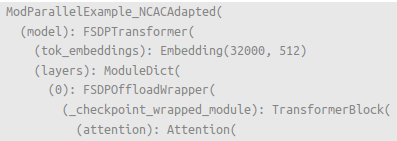
Warning
When specific features of the NCAC APIs aren’t required, using the composable AC API is recommended instead. Dynamically adapting the NCAC APIs is experimental and not all NCAC API functionality may work as intended in that context.
FSDP2 Default Keyword Arguments
As applying a common set of defaults to all FSDP2 directives is often useful, flexible
defaults to be applied to all fully_shard directives can be provided in an optional dictionary (
fsdp_default_kwargs). Module
name/pattern-specific keyword arguments provided via fsdp_plan will take precedence over these default
directives. All keyword arguments valid for fsdp_plan are supported.
FTS Distributed Composable API Training Examples
Distributed multi-phase scheduled finetuning is simpler and more powerful than before with FTS’s enhanced support for
the fully_shard/FSDP2 API. Using composable distributed APIs like fully_shard and checkpoint allows for the
composition of different forms of parallelism (e.g. FSDP2 and Tensor Parallel, other forms of parallelism coming soon
like Pipeline and Context Parallel).
The three examples in this tutorial assume basic familiarity with FSDP and Tensor Parallel training. For a good introduction, please see the following PyTorch tutorials for FSDP and TP respectively.
Note
The examples below are not configured to execute a full training session but instead to generate the minimal
meaningful profiling statistics for analysis and exposition (e.g. using only 4 batches, a small configuration for
torchtitan’s latest Llama etc.)
Starting from this tutorial’s base directory (fts_examples/model_parallel) demo schedule configurations are composed
with the same set of shared defaults , (./config/defaults/*.yaml) and can be executed as follows:
cd ./fts_examples/model_parallel

# Training with FSDP2 'Auto' Plan:
python mp_examples.py fit --config config/fts_fsdp_auto_plan.yaml

# TP Training:
python mp_examples.py fit --config config/fts_tp_plan.yaml

# FSDP2 `Auto` Plan thoroughly profiled with MemProfiler
python mp_examples.py fit --config config/fts_fsdp_profiling.yaml --config config/profiling/memprofiler_demo.yaml
All of these examples will use the same multi-phase schedule below (based on the latest torchtitan Llama model):
0:
  params:
  - model.output.weight
  - model.norm.*
  max_transition_epoch: 1
1:
  params:
  - model.layers.3.(feed_forward|ffn_norm|attention.w.*|attention_norm).*
  max_transition_epoch: 2
2:
  params:
  - model.layers.[0-2].(feed_forward|ffn_norm|attention.w.*|attention_norm).*
  - model.tok_embeddings.weight
FSDP2 ‘Auto’ Plan Generation/Application
FTS can leverage FSDP2 without any special accommodation by overriding LightningModule’s configure_model method
and manually applying the fully_shard API to the desired modules as outlined in the
Lightning FSDP2 guide.
The primary enhancement provided by FTS for this strategy is the ability to automatically apply the FSDP2 API to
modules based upon the user’s desired module name or regex patterns without overriding
LightningModule.configure_model.
This is done by providing a dictionary of module name/pattern-based FSDP2 API directives via
fsdp_plan. The keys of
fsdp_plan are either module names or regex patterns and the optional values are valid fully_shard keyword
arguments or any of the FTS convenience aliases.
As discussed above, fsdp_default_kwargs can be used to provide default
keyword arguments to compose with all fsdp_plan fully_shard directives.
For example, passing the below fsdp_plan to FinetuningScheduler via
strategy_adapter_cfg will apply the
fully_shard API to all TransformerBlock layers in the llama model as well as the final output module.
from finetuning_scheduler import FinetuningScheduler

my_plan = {
    "model.output": {"reshard_after_forward": True},  # any ``fully_shard`` API kwargs
    "model.layers.\d*$": {},  # default ``fully_shard`` kwargs used here
}

fts_cfg = dict(
    ft_schedule="config/defaults/llama_ft_schedule.yaml", max_depth=2, strategy_adapter_cfg={"fsdp_plan": my_plan}
)

fts_callback = FinetuningScheduler(**fts_cfg)
We can also use fsdp_default_kwargs to provide default keyword arguments to compose with all fsdp_plan
fully_shard directives. This example does so via the CLI and a yaml config and uses
FTS convenience aliases to enable cpu offloading and composable
activation checkpointing for all specified FSDP2 instances like so:
  strategy_adapter_cfg:
  fsdp_default_kwargs:
      reshard_after_forward: True  # default value of a normal ``fully_shard`` kwarg
      act_ckpt: ['composable']  # use composable AC with default kwargs
      cpu_offload_policy: {}  # apply default cpu offload policy
  fsdp_plan: {'model.output': {}, 'model.layers.\d*$': {}}
That’s it! We’ve configured composable/distributed/multi-phase/scheduled fine-tuning training and didn’t even need to
override LightningModule.configure_model!
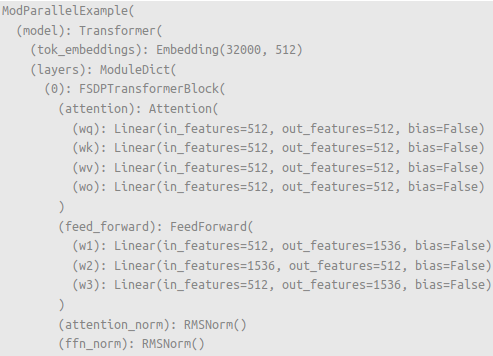
FSDP2 modules are composed with the provided modules as specified.¶ |
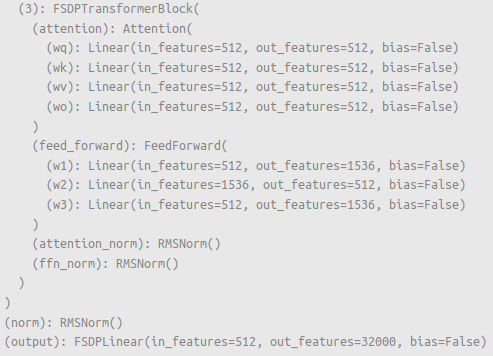
Modules not specified as separate FSDP2 instances remain normal modules (e.g. |
cd ./fts_examples/model_parallel
python mp_examples.py fit --config config/fts_fsdp_auto_plan.yaml
Tip
FTS will only apply fully_shard to a specified module if it was not already applied to that module, so using
fsdp_plan (and fsdp_default_kwargs) can be composed with existing fully_shard (or Tensor Parallel)
directives in LightningModule.configure_model.
Note
As with manual application of the API,
fsdp_plan directives should be
applied bottom-up. For instance, one should compose self.model.layer before self.model, e.g.
fsdp_plan: {'model.layer': {}, 'model': {}}
Tip
At time of writing, some optimizer operations do not support parameter groups with mixed DTensor/Non-DTensor
(usually torch.Tensor) parameters.

FTS will inspect the provided fine-tuning schedule and FSDP plan for this condition and if it is detected provide
the user INFO-level feedback like the above.
In the next section, we’ll cover Tensor Parallel (TP) training with FTS.
FTS TP Plan
FTS works with Tensor Parallel (TP) training without any special accommodation by overriding LightningModule’s
configure_model method and manually applying the relevant parallelism plan. Unlike the enhanced FSDP2 API, the
current version of FTS does not provide any auto-configuration enhancements for Tensor Parallel. For more on
constructing TP plans, see this
Lightning TP guide.
As you can observe in (./mp_examples.py) our TP plan in this example is applied as usual by overriding
LightningModule.configure_model like so:
def configure_model(self):

    if self.device_mesh["tensor_parallel"].size() > 1:
        # User-defined function that applies a given TP plan if desired
        apply_tp_plan(self.model, device_mesh=self.device_mesh, loss_parallel=self.hparams.exp_cfg.loss_parallel)
Note
FTS FSDP2 auto plan (and/or manual FSDP2 directives in LightningModule.configure_model) can also be composed with
TP plan directives in LightningModule.configure_model for 2D parallelism similar
to this example. Any specified
TP plan directives will be applied before subsequent FSDP2 directives.
cd ./fts_examples/model_parallel
python mp_examples.py fit --config config/fts_tp_plan.yaml